SFS Connectors
What is SFS?
SFS (Student Financial Software) is a payment plan and communication software offered by Flywire. SFS is designed to manage various financial transactions and communications for educational institutions, providing capabilities such as payment plan customization, automated and non-automated payments, and detailed account management.
Which systems can SFS integrate with?
| Student Information System |
Flywire On-Premise Connector On-Premise connectors are installed on your server. |
Flywire Cloud Connector Cloud connectors use APIs available for your SIS/ERP and require no installation. |
|---|---|---|
 Anthology Student Anthology Student |

|
|
 Banner Banner |

|
|
|
Colleague |
|
|
 PeopleSoft PeopleSoft |
|
|
 Workday Student Workday Student |
|
If you are using a home grown system, you can work with Flywire to develop a custom SFS integration.
How does the integration work?
This is a general overview of how data flows between the SFS and your SIS/ERP.
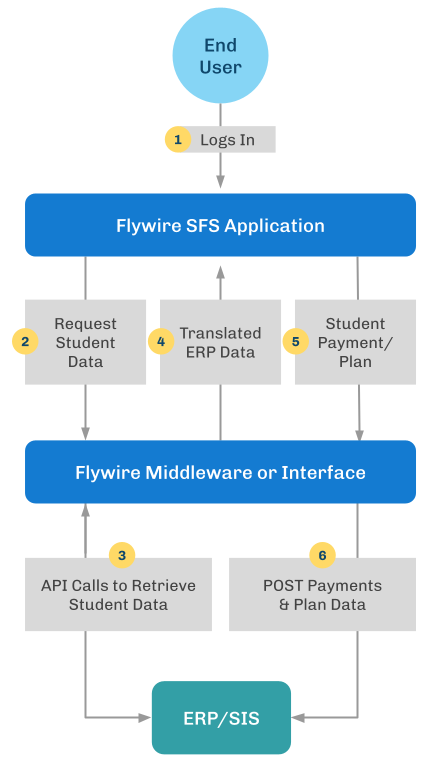
What type of integrations are offered?
You can use Flywire connectors to send and receive the following types of information:
| Integration Types | Description |
|---|---|
| RTSI |
Real-time Student Information (RTSI) allows Flywire to pull student information, transactions, balances, and other data from your system. |
| RTPN |
Real-time Payment Notification (RTPN) allows Flywire to send information about payments from the SFS to your system. |
| RPPN |
Real-time Payment Plan Notification (RPPN) allows Flywire to send information about payment plans to your system. |
| RT1098R (US only) |
Real-time 1098t (RT1098T) allows Flywire to pull 1098t data from your system. |
| RTSQ |
Real-time Student Query (RTSQ) allows Flywire to query your system database in bulk in order to power targeted communication. Not available for all systems.
|
More information is available in the Flywire guide that is provided for your SIS/ERP.
What kind of work is required for Flywire connectors?
The integration between the SFS and your SIS/ERP requires your IT department to work with Flywire's implementations team.
Before an integration can be completed, you will need to prepare your system. You must:
-
Verify your system meets the system requirements.
-
Whitelist Flywire's IP addresses.
-
Determine whether your students will use SSO to log into the SFS.
If you are interested in a connector for your system, please contact Flywire Support at [email protected].
Integration Guides for SFS Connectors
Connector integration guides require a password. To receive the password please contact Flywire Support at [email protected].
Anthology
| Name | Version | Guide |
|---|---|---|
| Flywire Cloud Connector Integration Guide for SFS and Anthology | 1.1 |  Flywire Cloud Connector Integration Guide for SFS and Anthology Flywire Cloud Connector Integration Guide for SFS and Anthology
|
Banner
| Name | Version | Guide |
|---|---|---|
| Flywire Cloud Connector Integration Guide for SFS and Banner | 1.4 | Flywire Cloud Connector Integration Guide for SFS and Banner
|
| Flywire On-Premise Connector Integration Guide for SFS and Banner | 1.6 | Flywire On-Premise Connector Integration Guide for SFS and Banner
|
Colleague
| Name | Version | Guide |
|---|---|---|
| Flywire Cloud Connector Integration Guide for SFS and Colleague | 1.5 | Flywire Cloud Connector Integration Guide for SFS and Colleague
|
| Flywire On-Premise Connector Integration Guide for SFS and Colleague | 1.6 | Flywire On-Premise Connector Integration Guide for SFS and Colleague
|
PeopleSoft
| Name | Version | Guide |
|---|---|---|
| Flywire On-Premise Connector Integration Guide for SFS and PeopleSoft | 2.3.0 |
Flywire On-Premise Connector Integration Guide for SFS and PeopleSoft
|
| Flywire On-Premise Connector Configuration Guide for SFS and PeopleSoft | 2.1.0 |
Flywire On-Premise Connector Configuration Guide for SFS and PeopleSoft |
Workday
| Name | Version | Guide |
|---|---|---|
| Flywire Cloud Connector Integration Guide for SFS and Workday Student | 1.2 | Flywire Cloud Connector Integration Guide for SFS and Workday Student
|
SFS Integration with Home Grown Systems
| Name | Version | Guide |
|---|---|---|
| Flywire Student Financial Software Integration Guide | 1.0 | Flywire Student Financial Software Integration Guide
|